How to Improve Client Communication and Collaboration With Houzz Pro
Make sure your clients have a great experience working with you from start to finish. You’ll gain repeat customers and get more referrals.

You don’t just want clients to be satisfied with the results of the project, you want them to be impressed with your company all along the way. When clients trust you and enjoy working with you starting from that very first message or phone call, you’re more likely to get hired in the first place, and generate business in the future with repeat business and referrals.

Houzz Pro makes delivering a world class customer experience easy. Learn more:
A client experience that will set you apart from the competition includes great communication and prompt follow-ups, professional touches like beautiful branded estimates, and easy client collaboration so your client always feels like you keep them up to date with exactly what is happening and when.
1. Communicate and collaborate in one centralized place
Great client communication and collaboration starts with our central messaging center. You can send email, documents, photos and more - from desktop or right from your phone with the Houzz Pro app.
All your messages sent via Houzz Pro are sent through email to your customer (and if they have a Houzz account, they’ll also receive your messages in their Houzz inbox), are beautifully branded with your company logo and information, and all of your communication history is readily available in chronological order.
2. Easily track the progress of your project, add private notes for you and your team, and let clients schedule meetings with you based on your availability.
You can move your leads or projects from stage to stage so you know when it’s time to follow up. Had a phone call with a client? Log your call in Houzz Pro to keep a record of your communication history, and jot down any notes that you may want to access later. You can create timelines for different projects or tasks, and get a birds eye view of all the activities that are going on for each client.
We know that neither you or your clients enjoy the back and forth that scheduling a meeting calls for. You can save everyone time by sharing your personalized booking link with clients, so they can schedule meetings with you based on your availability. Your booking link syncs with your calendar so meetings are organized and seamless.
When you schedule meetings through Houzz Pro or your client schedules meetings through your booking link, you both receive meeting confirmation emails (which make it easy to cancel or reschedule!) and a calendar event automatically appears on both calendars.
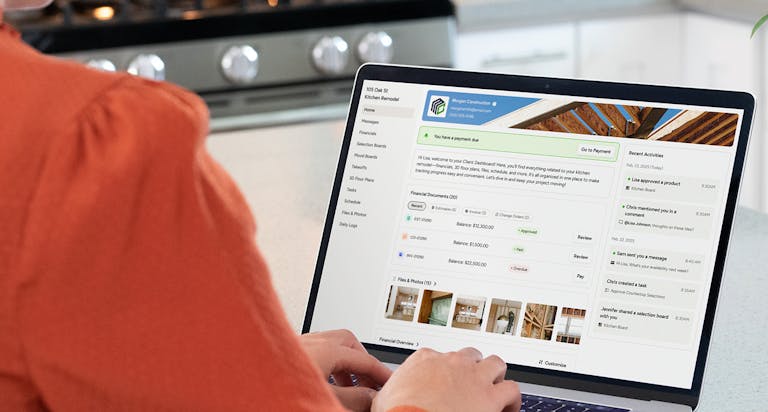
3. Offer a client portal where clients can see how their project is progressing.
Impress your clients with your thoughtful professionalism. Give them access to a client portal that showcases your business and logo. You can make key information available - you decide what you want your clients to have at their fingertips. This can include your communications, photos, documents, estimates, invoices, project timelines and more.
Give customers even more reason to sing your praises with a fantastic client communication and collaboration experience in Houzz Pro. Have questions? Leave a comment below!


Want advice delivered to your inbox?
Unlock industry insights and updates for contractors and design pros
By signing up, I agree to the Houzz Terms of Use and Privacy Policy and that Houzz may use my information to contact me about relevant content, products, and services.