Free Template: How to Write an Architect’s Invoice
Hone your invoicing skills with our architect’s invoice sample and downloadable, architect’s invoice template.

This content was originally published Sept. 17, 2023, but was reviewed April 6, 2026, and is up to date.
Are you an architect looking for a way to maximize your bottom line by streamlining the administrative tasks of your business? Then this guide is for you. Here, you will learn how to create an effective architect invoice to help you get paid quickly and accurately. You will also find details about how to use an invoice template for architects to simplify the process.
Included is a free downloadable, editable template to help you get started. The architect invoice template is fully customizable to meet your business needs, and means you do not have to start from scratch every time you write an invoice.
Click on a link below to jump to the section you’re most interested in:
- Download our free architect’s invoice template
- What is an architect’s invoice?
- Why is having an architect’s invoice template important?
- When do you send an architect’s invoice?
- What should be included in an architect’s invoice?
- Optional sections to include in an invoice template for architectural services
- How to create an architect’s invoice template step-by-step
- Alternatives to invoice templates for architectural services
- Final architecture invoicing tips
Download Our Free Architect’s Invoice Template
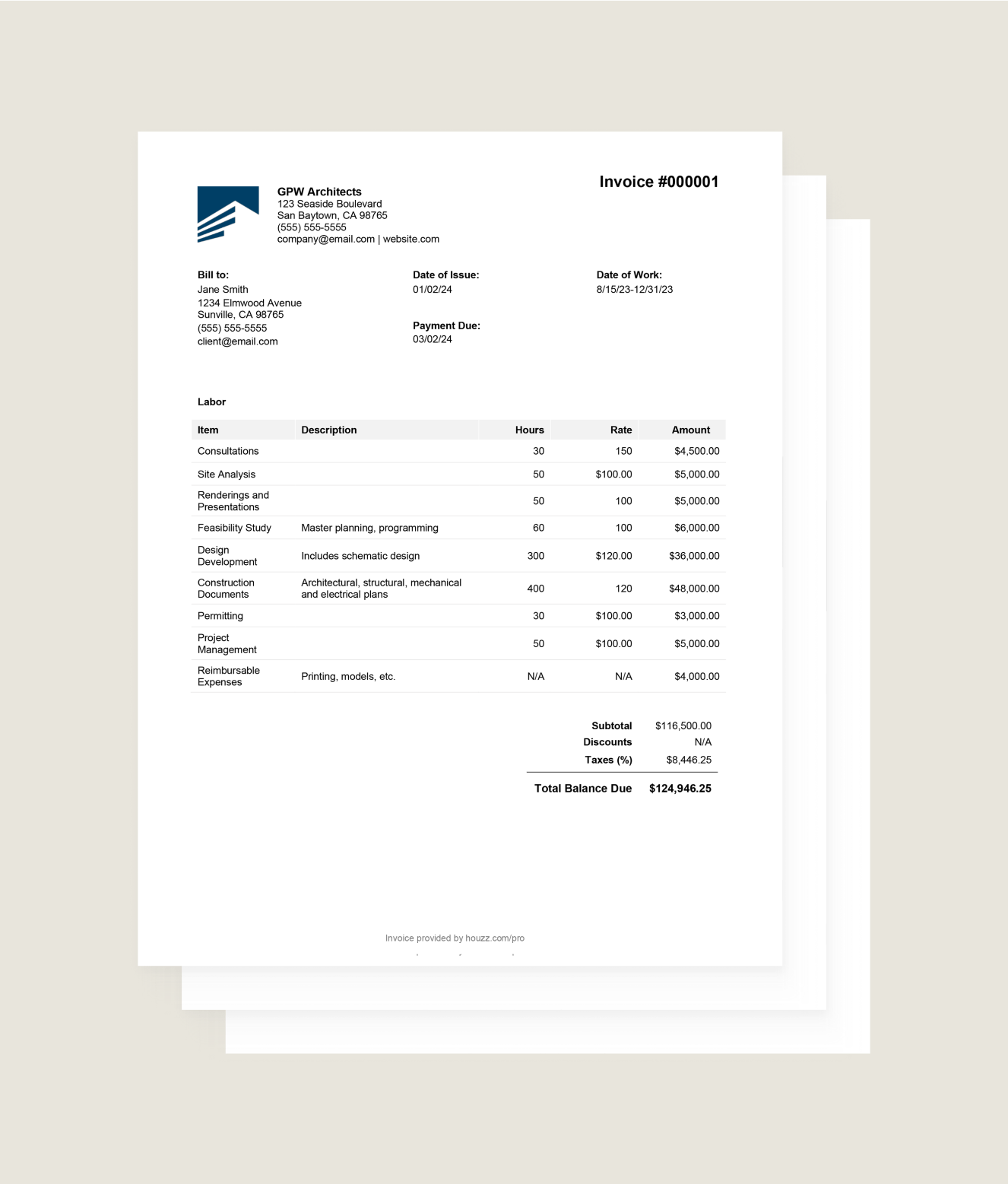
Get Started With This Free Architecture Invoice Template
Fill out this Architecture Invoice Template to get paid.
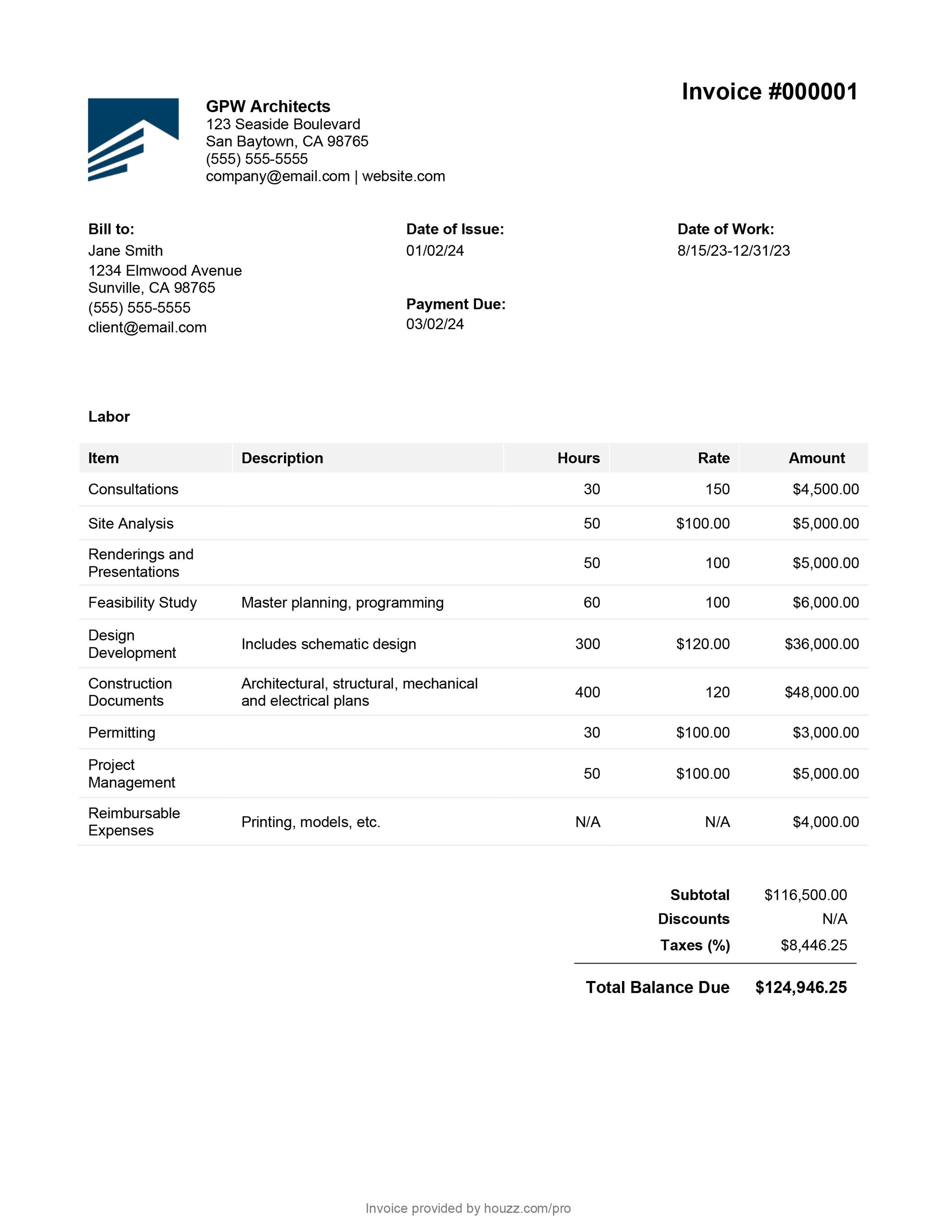
Whether you are a new architect just starting out or a more experienced one looking for ways to run your business more efficiently, the more time you can save on administrative tasks, the more time you will have to focus on projects and following up on leads to add more to the pipeline.
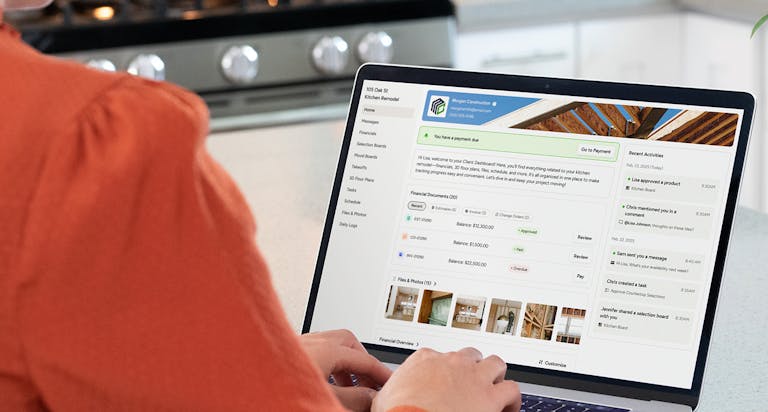
An architect’s invoice template is a great way to get started when you are learning invoicing, but many professional architects find architect invoicing software is more efficient over the long term. Houzz Pro business software specifically designed for architects is all-in-one, so you can use it for invoicing, estimates, project tracking, and collaboration. Explore our invoice templates for architects with a free trial of Houzz Pro.

What Is an Architect’s Invoice?
Also known as architecture bills and receipts, invoices are the documents that professional architects use to bill their clients for the work and services they provide a client. It includes the type of services, such as space planning or design services, and details the cost of each one.
The details provided in an architectural invoice depend on the type of billing and pricing structure you agreed upon with your clients. Here are some common methods professional architects use:
- Percent of construction fee - With this method, the client and architect define the services, budget, and nature of the work. The architect is then paid a percentage of the total construction fee.
- Lump sum - When charging a lump sum for a project, make sure you set the parameters on time, size, and cost of the project. This type of billing is best done when you know the scale and scope of the project in advance.
- Payment schedule - Billing in stages of a project can help assure your business receives a steady flow of revenue. It also can help homeowners better manage their budget for the work.
- Hourly - Charging for a project by time, such as an hourly rate, can be beneficial when the entire scope of the work is not known at the start.

Types of Architecture Invoices
Invoices also vary in type, depending on the terms and conditions.
- Standard - This type of invoices provides details on the type of services provided and the costs.
- Recurring - In cases where a payment schedule has been agreed upon, a recurring invoice is sent when each stage is due.
- Prepayment - This type of invoice is used to collect an initial deposit or down payment before you begin providing your services.
- Time-based - A time-based invoice details the hourly rate agreed upon at the start of a project and the number of hours you spent providing those architectural design services.
- Credit - When refunds or rebates are issued to clients, a credit invoice is issued to their account for that amount.
- Debit - A debit invoice notes when there has been an increase in the cost of the services being provided.
- Mixed - This type of invoice summarizes both credits and debits to your clients account.

Why Is Having an Architect’s Invoice Template Important?
The bottom line of providing accurate architecture invoicing is the bottom line. It helps assure that you are paid accurately and quickly for the professional services you provide your clients. A professional invoice provides your clients a detailed accounting of your services, so they can see the value they are receiving and the costs behind the work. Not only does it help ensure that you get paid accurately and on time, but it also helps you convey professionalism and build trust with your clients. An architect’s invoice provides a record of the work and helps clear up any misunderstandings. It also gives you the financial and legal records needed in your business.

When Do You Send an Architect’s Invoice?
When you send an architect’s invoice depends on the terms and conditions agreed upon with your clients. You may send one before your work begins if they have agreed to make an upfront deposit. Or, you may wait to send one until after your work in complete or between stages. Whenever you send invoices, it is important to send them as promptly as possible to help assure that you are paid on time. A consistent revenue flow is crucial to any business, and an architectural firm is no exception.

What Should Be Included in an Architect’s Invoice?
When it comes to creating an architect invoice, there are certain pieces of information that are essential to include. These details not only ensure that your clients have all the necessary information to process the payment, but they also help establish transparency and professionalism in your billing process.
- Company information - Make sure to include your business name, address, and contact information prominently on the invoice. This helps your clients easily identify who the invoice is coming from and where they can reach you if they have any questions or concerns. Adding your logo and any other company branding also enhances the professional look of the invoice.
- Client information - Provide clarity by adding the client’s name, contact information, and any other pertinent details.
- Invoice number - An intuitive and sequential numbering system is crucial for keeping invoices organized and locating them as needed. One project may have several invoices; therefore, each one should be numbered in order and in a way that distinguishes them from another client.
- Invoice date - Besides providing accurate record-keeping, adding the date helps avoid questions down the line about when an invoice was sent and when the payment is due.
- Payment due date - Set a due date according to your terms and conditions. This provides a sense of urgency and encourages your clients to make the payment promptly. Be sure to give them enough time to review the invoice and make payment arrangements.
- Table of services and labor provided - This is the heart of the invoice because it details the services and labor you provided and the cost of those services.
- Summary of costs - Besides the services provided, this also incorporates any other costs and expenses associated with the flooring work.
- Payment methods accepted - Make it convenient for clients to pay the invoice by offering more than one payment method. Include an online option. Customers want to know the methods are safe and secure, so do your research before choosing.
- Payment terms - Specify the terms of the payment. Note if the entire balance is due and when. Include charges for late payments or any incentives for early payments. Do you offer a payment plan?

Optional Sections to Include in an Architectural Invoice Template
- Additional project details - Consider if there are other project details or highlights of your services that you want to include for clarity and thoroughness.
- Thank you note - Some professionals add a personalized message expressing their gratitude for the opportunity to work with them and reminding them of the outstanding payment. This adds a personal touch and shows your professionalism and appreciation.
- Future architectural projects - Remind your client of additional services you can help with in the future or note some of the other projects you are currently working on.
- Website - Add your website address and social media accounts to help them keep in touch or recommend your services to a friend or colleague.

How to Create a Architect’s Invoice Template Step-by-Step
Here are the steps to get started on creating an architectural invoice:
- Choose your tool - With so many tools available, there is no need to start with a blank screen when creating an invoice. A template, like the one we have provided, is a great way to start because it serves as a guide of what to include in an invoice. The architect invoice template is downloadable, so it is easy to email to clients and print out. Also, since it is fully editable, you can customize it to meet your needs and add branding to make it uniquely yours. Architect invoicing software is another great way to up your invoicing game because it is even more advanced than templates.
- Review - Next, find all the documents you will need to calculate the costs. Review the initial estimate, quote, or bid as well as any changes that occurred during the life of the project. Check any time and expense tracking logs associated with the project.
- Detail services - Adding detail provides clarity and helps resolve any potential confusion or disputes. By providing detailed descriptions of the services rendered you give your clients a clear breakdown of what they are being billed for, helping them understand the value they are receiving.
- Ensure overhead is covered - Have you accounted for the overhead expenses of running your business? Figure your annual administrative costs and business expenses and then prorate them to the number of days or hours you devoted to the project. This will give you your total overhead costs for that time period.
- Profit margin - Incorporate your expected profit margin to assure that your firm will continue to grow and thrive.
- Calculate total costs - Add up all the costs associated with the project to reach the balance due.
- Double check - Ask someone you trust to review the invoice before you send it, look at it one more time, and then deliver it to your client.
- Track payments - One of the most important steps comes after the invoice is sent. Track the payments and follow up with any clients who missed the payment deadline.

Alternatives to Invoice Templates for Architectural Services
Automation tools can help simplify your workflow in various ways. For instance, you can use software to automatically generate and send invoices to clients. These tools allow you to input the necessary information once, such as client details, services provided, and rates, and they will generate and send invoices.
User-friendly options such as Houzz Pro are more advanced than downloadable templates and help professional architects run their businesses more efficiently. Project management tools that integrate with your invoicing system help keep track of the status of each invoice. This way, you can easily see which invoices are pending, paid, or overdue and follow up with clients accordingly.
Invoice and billing software lets you easily sync invoices, purchase orders, estimates, and proposals. You can set up automated payment schedules and accept payments and deposits online from any device. It helps you better understand the financial health of your business by tracking income, costs, and profitability per project. Explore the invoicing features of Houzz Pro architect invoice and billing software.

Final Architecture Invoicing Tips
- Document pricing - Make sure you have documentation available to support your pricing. A well-prepared and error-free invoice not only ensures that you get paid the correct amount, but it also builds trust and credibility with your clients.
- Use a tracking tool - Writing an invoice at the end of a project is much easier when you have all the information at hand. Use an accurate time and expense tracking tool throughout the project, so that you have the information at your fingertips when it comes time to draft the invoice.
- Pay attention to details - An invoice should provide enough detail, so that your clients understand the breadth and depth of the services you provided. This gives context and clarity for both you and your clients.
- Consider requesting deposits - Seeking an upfront payment before work begins provides cash flow to your business and helps ensure that your client is committed to the project.
- Offer payment schedules - Offering payment schedules can help both you and your clients manage your budgets.
- Explore invoice management software - Technology can help you with the tedious tasks of creating, organizing, and tracking invoices. This is a job that gets bigger as your firm grows, and management software helps you do it more efficiently.
- Keep invoices secure - Invoices should be stored in a safe and secure place, so they can be accessed in the future (especially during tax season) and to protect the privacy of both you and your clients.
- Follow up on past due invoices - Have a procedure in place for tracking and following up on past due invoices. If the due date passes, follow up politely with a friendly reminder. Your client may have simply overlooked the invoice. If you still do not receive a payment, send a more formal request and details of next steps. Keep a record of all communication regarding the invoice. This documentation can be useful in case of any disputes.
- Make payment terms clear - Provide clarity on the payment terms, so that everyone is on the same page, and so your client understands when the payment is due, additional charges for late payments, and steps that will be taken if payment is not received.

Conclusion
Providing accurate and professional architect invoices is a key part of running your architectural business. It not only ensures that you are paid the correct amount for your services, but it also builds trust and credibility with your clients. The information included in invoices can help you better understand the profit your business is earning on projects over time and where you can improve the profit margins.
An architecture invoice template is an effective learning tool to get started and hone your invoicing skills. But many professional architects soon shift to all-in-one business software to produce invoices more quickly and easily, and to run their entire business more efficiently. Sign up for a free trial of Houzz Pro architect business software to explore our invoicing features and more.
Learn more about how technology can help you meet your business goals and Why Technology Is Crucial to Marketing Your Architect Business.


Want advice delivered to your inbox?
Unlock industry insights and updates for contractors and design pros
By signing up, I agree to the Houzz Terms of Use and Privacy Policy and that Houzz may use my information to contact me about relevant content, products, and services.