Free Template: How to Make a Contractor Invoice
Streamline your billing process with our guide to how to make a contractor invoice. Download our free general contractor construction invoice example and template today.

This content was originally published Sept. 10, 2023, but was reviewed May 20, 2026, and is up to date.
Billing your clients for your services and getting paid on time is one of the most crucial aspects of succeeding in the contractor business. In this article, we explore how to create a contractor invoice with step-by-step tips for doing an invoice from start to finish.
Included is a free, downloadable and editable template to get you started. The contractor invoice template is easy to use and a free download, so you can print it out or easily email to a client, and you can customize it to fit your business. It also includes a general contractor construction invoice sample, so you can see how other GCs write up their bills.
Click on a link below to jump to the section you’re most interested in:
- Download our free general contractor invoice template for Excel & Word
- What is a general contractor invoice?
- Why are general contractor invoices important?
- When do you send a general contractor invoice?
- What should be included in a simple contractor invoice template?
- Optional sections to include in a general contractor invoice template
- How to create a general contractor invoice template step-by-step
- Alternatives to general contractor invoice templates
- Final tips for how to make a contractor invoice
Download Our Free General Contractor Invoice Template for Excel & Word

Get Started With This Free General Contracting Invoice Template
Fill out this General Contracting Invoice Template to get paid.
Running a contractor business isn’t easy, especially when there are so many moving parts to manage outside of doing the actual construction work. Luckily, there are many tech tools available to help you run every aspect of a construction business more efficiently. For those starting out, using an invoice template is a great way to get started and learn how to master invoicing.
But many construction professionals quickly learn that contractor invoicing software makes the task even easier and is more efficient over the long haul.
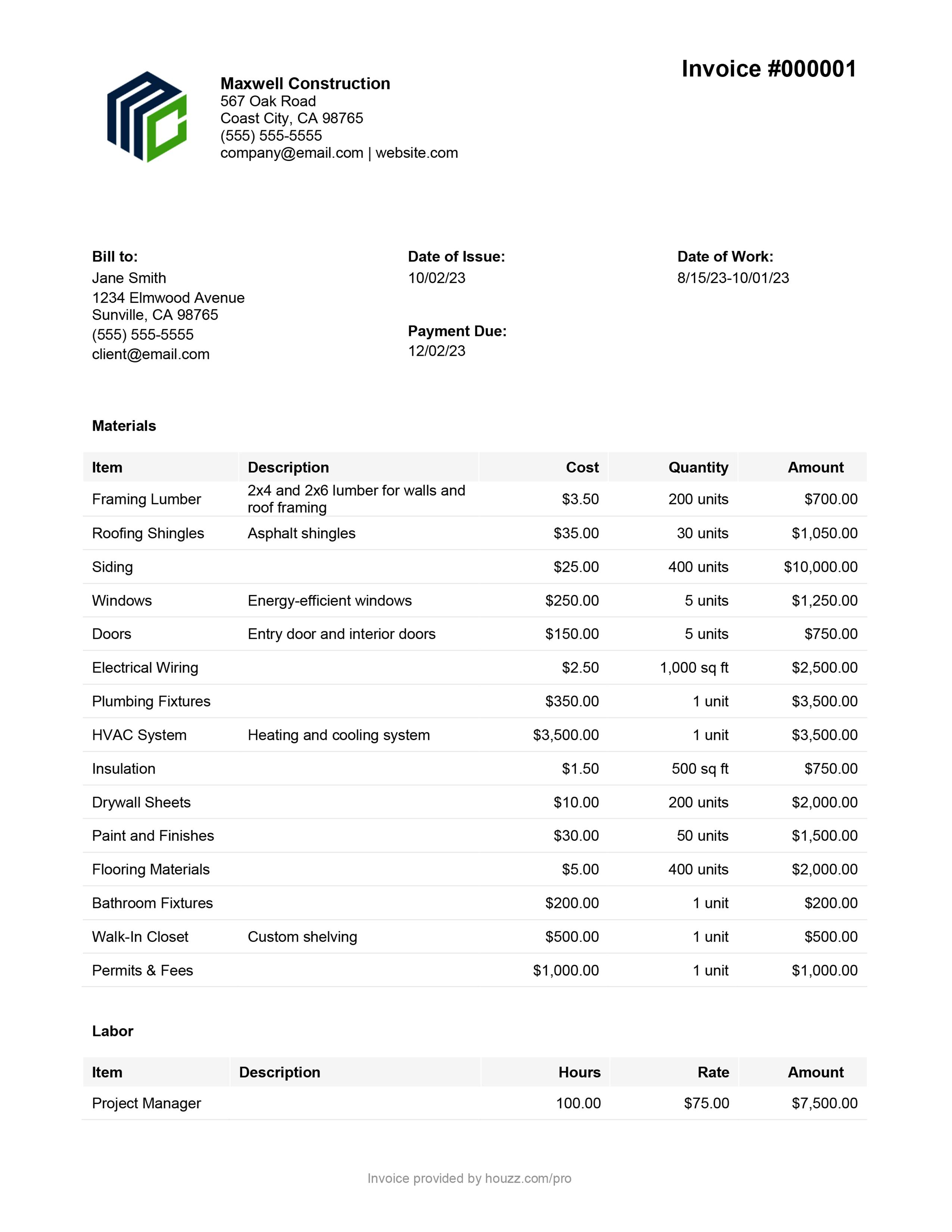
General Contractor Construction Invoice Sample
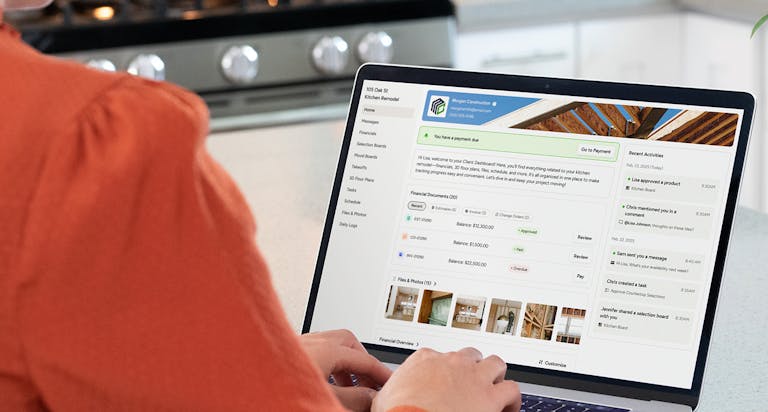
All-in-one business software for contractors helps you write invoices, track them, and send overdue notices to clients who are late in paying. Explore our management software and additional invoice templates with a free trial of Houzz Pro.

What Is a General Contractor Invoice?
Sometimes referred to as a bill or receipt, a general contractor invoice is the document contractors send to their clients at the end of the project or at various intervals in order to get paid for their work. It documents and tracks the payment for the work on a project, the cost of each, and the total amount due. It is a formal request for payment from the contractor for the services and materials and other expenses associated with the job.

Why Are General Contractor Invoices Important?
Sending an accurate, professional, and timely contractor invoice is a crucial step in every job, and it helps assure the success of your business. Making your billing process as smooth as possible will help your bottom line and help you get paid promptly for the hard work you do.
An invoice also serves as a legal record, and providing a detailed invoice that documents the work performed can help clear up any misunderstandings or disagreements that arise. The quality of the invoice demonstrates your professionalism and because it is often the final document you will send a homeowner, it leaves them with a last good impression that will make them more likely to recommend your services, or call you next time they need work done.

When Do You Send a General Contractor Invoice?
A general contractor invoice may be sent at various times during a project lifecycle, depending on the terms and conditions agreed upon at the start of the job. Contractors may send one before any work begins to request a deposit or payment upfront. Another one might be sent after a certain amount of the work is completed. And, of course, there is the final invoice sent at the end of a project that seeks the final balance.
No matter the pacing of the invoices, sending them on time is key to getting paid. The sooner you deliver the invoice, the sooner you are likely to get paid. Therefore, send the final invoice as soon as you have calculated all the costs of the project, ideally within 48 hours.

What Should Be Included in a Simple Contractor Invoice Template?
There is certain basic information that should be included in a contractor invoice template to make it professional, accurate, and thorough. Here are some of those elements:
- Company information - Include your company name, logo, and branding to give the invoice professional polish and to help the client recognize immediately who is sending the invoice. Make your contact information prominent, so the homeowner can easily reach you.
- Client details - The client name and contact information helps you keep invoices organized by project.
- Invoice numbers - Keeping invoices in order and organized requires setting up an intuitive numbering system. For example, the final invoice may be the third or fourth in the sequence of invoices for this project. Make sure each one is numbered uniquely for this particular client and in sequence.
- Invoice date - Dating your invoice is not only important for keeping them organized, both also for you and your client. Having a date on the invoice also helps indicate when a payment will be overdue.
- Payment due date - Clearly state when the payment is due, so your client knows how long they have to remit the balance. This is often within 30 days.
- Table of labor and materials - This is a detailed accounting of the labor and materials used to complete the project. Be specific about the type of materials such as the brand, size, and more. Then, include the unit price for each set of materials listed, and the hourly rate for tradespeople and subcontractors.
- Summary of costs - This is the final calculation of all costs related to the project, including other expenses beyond materials and labor.
- Payment methods accepted - Make it easy for your clients to pay you, and for you to process them. List the payment methods your business accepts, including a convenient online method. Of course, it is crucial to ensure that the methods are safe and secure.

Optional Sections to Include in a General Contractor Invoice Template
Beyond the basics, some contractors include other details to provide clarity and increase the chances their client will call on them again. These additions will vary depending on the project and circumstances. Here are some to consider:
- Thank-you note - Adding a personal touch can leave a good lasting impression, showing clients that your company is professional and goes the extra mile.
- Future construction projects - Include examples of future construction projects you can help the homeowner with. These suggestions can help them start thinking about other ways they want to improve their living spaces.
- Your website - Add your website address and any social media accounts. This makes it easy for clients to stay in touch with you and your work down the road. Plus, they can use the information to recommend your company to friends and family.

How to Make a Contractor Invoice Template Step-by-Step
When creating a contractor invoice, it's crucial to include specific project details to ensure transparency and avoid any confusion. Here’s a step-by-step guide to get started:
- Choose the right tool - There is no need to stare at a blank screen. Today, there are plenty of tools available to make invoicing easier. If you decide to use an invoice template, choose one that is downloadable, so it is easy to print the document or email it to clients. Make sure it is editable, so you can customize it to make it uniquely yours. Better yet, use a business software designed for contractors to not only ease your invoicing burden, but also to help you juggle all aspects of running a contractor business.
- Review - Start by refreshing your memory. Gather and review the initial estimate, quote or bid, change orders, time/expense tracking logs, and any other pertinent documents you will need to write up the invoice.
- Specific job details - This section of the invoice provides a breakdown of the services you provided, the materials used, and any additional expenses incurred during the project.
- Materials - Include a thorough description of the materials used. This includes the brand, type, and quantity of all the many materials that went into constructing the project. Also, include any additional materials. Providing this information allows your clients to see the value they are receiving and demonstrates your transparency.
- Labor - Clearly list each individual service provided, along with the hours worked and hourly rate. Specify the type of tradespeople who were hired and the work they carried out whether it is plumbing, HVAC, electrical, and more. These specifics show your homeowners the care and attention you pay to detail and ensures that they understand exactly what they are paying for.
- Other expenses - Itemize any additional expenses incurred during the project, such as travel costs, permits, or fuel. By including these details, you show your clients that you are honest and transparent in your billing practices.
- Markup and overhead - Did you fold in the overhead expenses of running your business and incorporate your profit margin?
- Calculate total costs - With all the costs accounted for, add up the total and do not forget to add and itemize any applicable taxes. Double check your math.
- Review and send - Ask someone you trust to look over the invoice, then proofread it again, review, and hit send.
- Track payments and follow up - Set up a system to track payments and follow up with a thank you for prompt payment or a nudge for overdue ones.

Alternatives to Contractor Invoice Templates
No contractor wants to spend hours poring over invoices. In addition to contractor invoice templates, other tech tools can help you significantly streamline your invoicing process, saving you time and effort. They include features like automated reminders for overdue payments and the ability to track the status of your invoices.
By leveraging technology, you can eliminate the need for manual calculations and paperwork, allowing you to focus more on the projects you have and getting more. Using technology to simplify the invoicing process not only saves you time and effort but also helps you maintain a professional image with your clients, who expect businesses to have the latest tech.

Final Tips for After You’ve Drafted a Simple Contractor Invoice Template
- Document your pricing - Make sure you have documentation that backs up all your charges for materials and services in case questions arise.
- Use time and expense tracking tools - Using the right tools upfront will save you at the end of the project. Use an accurate and efficient tracking tool during the renovation or build project, so that you will have easy to access records of the time and money spent on the job.
- Be detailed - Be as specific as possible about the services and materials you provided. The detailed accounting shows your clients that you pay attention to detail and ensures that they understand exactly what they are paying for. It also helps your clients to see the value they are receiving.
- Request deposits - Asking for an initial upfront payment provides your business with a more even cash flow and helps ensure that your clients are committed to the project.
- Offer payment schedules - Pacing project payments throughout the lifecycle of a project can help your clients budget for the work and provide your business a steady flow of revenue.
- Store invoices safely - Make sure invoices are stored securely should questions arise in the future and to ensure your client's contact information is kept private. You may also need these documents going forward, especially during tax season.
- Follow up on past-due invoices - Create an intuitive system to keep your invoices organized and track when they are overdue. Online systems will offer you the most efficiency to help assure that you receive the hard-earned money you deserve. If a client's payment is overdue, follow up promptly. Send a friendly reminder email or call to ask about the status of the payment. Be professional and understanding, as the client may have simply overlooked the invoice. If you receive no response, it may be necessary to take further action. Consider sending a more formal letter, outlining the consequences of non-payment and stating that you may need to pursue legal action or involve a collections agency if the issue remains unresolved. Don’t leave money on the table.
- Offer convenient ways to pay - Make it easy for your clients to pay their bills. Offer multiple payment methods including online options that are reputable, safe, and secure.
- Make payment terms clear - Set your payment terms policies and make sure they are clearly stated on your invoices to avoid confusion.

Conclusion
Invoicing is a crucial part of any successful contracting business. Invoices ensure that you are paid fully and quickly for the work you do. Making a professional contractor invoice template leaves a good impression with clients and makes it more likely they will recommend your business or call you next time they need a job done.
Applying these tips and using the latest tools along with the general contractor invoice example above will help you create accurate, professional-looking invoices time after time.
Using Houzz Pro all-in-one business software specifically designed for contractors will help you create invoices more quickly and run your business more efficiently. Explore the invoicing features and more in our General Contractor Business Software.


Want advice delivered to your inbox?
Unlock industry insights and updates for contractors and design pros
By signing up, I agree to the Houzz Terms of Use and Privacy Policy and that Houzz may use my information to contact me about relevant content, products, and services.